..... FURNITURE 7 ePARTS for Architectural Desktop 2007 and up
IMPERIAL UNITS - RESIDENTIAL FURNITURE
PRODUCT OVERVIEW

Contents:
Greetings ---- Product Features ---- Purchase

Open in Separate Window

1Greetings .1-1 FURNITURE 7 ePARTS OVERVIEW
Introduction
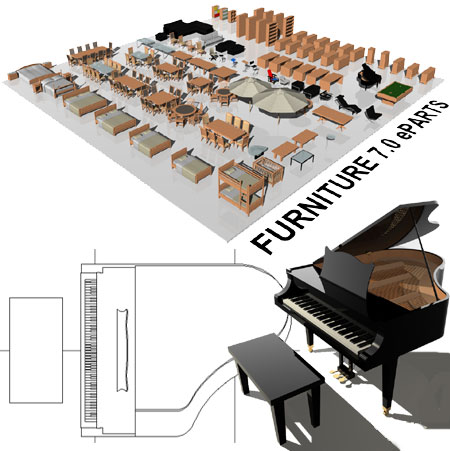
Thank you for your interest in the Furniture 7 eParts product by ARCHIdigm.  This product consists of 81 Multi-View Blocks and 19 highly customized Curtain Wall Styles depicting a variety of commonly used residential furniture objects.

This product contains one downloadable drawing file configured for use in ADT 2007 and ACA 2008 and up.  Users can install this product through the Content Browser as a new Catalog or place the drawing file anywhere on their machine or network drive and add Objects to a custom palette.

Note:
This is not a stand-alone software product; it is a library of Object Styles for use in AutoCAD® Architecture 2008-2011 CAD program.


2Product Features 2-1 FURNITURE 7 ePARTS OVERVIEW
The Levels of Detail

All ePart Objects have been optimized for work using the Architectural Desktop 2007 - 2010 "Aec model (imperal - ctb).dwt" and "Aec model (imperal - stb).dwt" default template files.
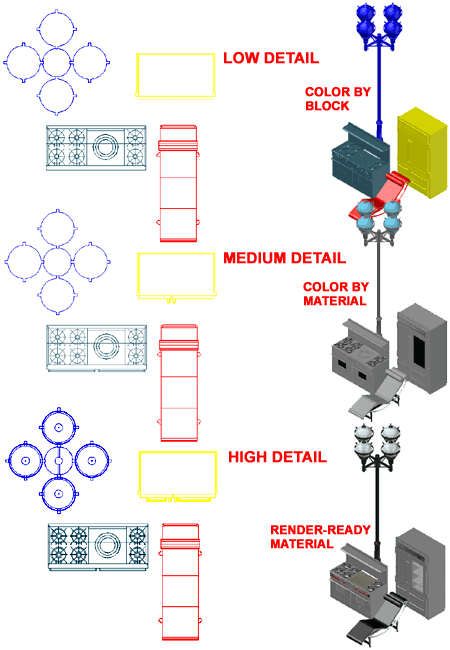
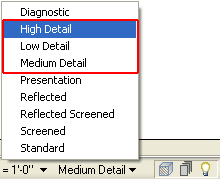
Illustrated to the right is an example of how the three primary Display Representations, Low, Medium and High Detail, affect ePart Objects.  Most ePart Objects include an AecPolygon Style set to Mask background information.  This mask can be turned off if desired.

Low Detail
The Low Detail Display Representation will affect the Plan and Model Display Representations.  In Plan View linework has been simplified to a little as possible while conveying the basic information of the Object.  In Model View this Detail Display Representation will show Objects in Colors you specify by direct assignment or by Layer; i.e., the Objects are set to "ByBlock".

Medium Detail
The Medium Detail Display Representation will affect the Plan and Model Display Representations.  In Plan View you will see either see the same amount of detail as under Low Detail or High Detail depending on what we considered the better choice.  In Model View Colors are determined by the Material assignment and do not use image maps.

High Detail
The High Detail Display Representation will also affect the Plan and Model Display Representations.  In Plan View all linework is displayed..  In Model View Objects will display Materials by their image map assignment ready for Rendering.


Content in this Package: (see Example Palette)

Furniture (Single - MvBlocks)
I_Furn_Bed_Bunk_1
I_Furn_Bed_Crib_1
I_Furn_Bed_Double_1
I_Furn_Bed_King_1
I_Furn_Bed_King_2
I_Furn_Bed_King_3
I_Furn_Bed_Queen_1
I_Furn_Bed_Twin_1
I_Furn_Cabinet_Bludot_MD-1
I_Furn_Cabinet_Bludot_MD-3
I_Furn_Cabinet_Bludot_MD-4
I_Furn_Cabinet_Bludot_MD-5
I_Furn_Cabinet_Bludot_MD-6
I_Furn_Cabinet_Wall_Doors_1
I_Furn_Cabinet_Wall_Doors_Top_Bottom_1
I_Furn_Cabinet_Wall_Drawers_Doors_1
I_Furn_Cabinet_Wall_Shelves_1
I_Furn_Chair_Baden_Bar_Stool
I_Furn_Chair_Bar_Stool_1
I_Furn_Chair_Brno
I_Furn_Chair_Corbusier_Chaise
I_Furn_Chair_Corbusier_Club
I_Furn_Chair_Dining_1
I_Furn_Chair_Dining_2
I_Furn_Chair_Dining_3
I_Furn_Chair_Dining_4
I_Furn_Chair_Lounge_1
I_Furn_Chair_Office_Generic_1
I_Furn_Chair_Rietveld_Red_Blue
I_Furn_Chair_Rohe_Barcelona
I_Furn_Chair_Stool_LEM
I_Furn_Chair_Stool_Zanzibar
I_Furn_Chair_Wassily
I_Furn_Couch_1_Long
I_Furn_Couch_1_Medium
I_Furn_Couch_2_Corner
I_Furn_Couch_Corbusier_Club
I_Furn_Credenza_1
I_Furn_Credenza_1_18w
I_Furn_Credenza_2
I_Furn_Credenza_2_18w
I_Furn_Credenza_3
I_Furn_Credenza_3_18w
I_Furn_Desk_1_60x34
I_Furn_Desk_2_60x34_Ped_Left
I_Furn_Desk_3_60x34_Ped_Left_Right

Furniture (Single - MvBlocks)
I_Furn_Dining_Set_1_42x72
I_Furn_Dining_Set_1_42x96
I_Furn_Dining_Set_2_39x63
I_Furn_Dining_Set_2_39x94
I_Furn_Dining_Set_3_48dia
I_Furn_Dining_Set_3_60dia
I_Furn_Dining_Set_4_48x48
I_Furn_Dining_Set_4_60x60
I_Furn_Dining_Set_5_46x92
I_Furn_Dresser_1_19x22x52
I_Furn_Dresser_1_19x32x52
I_Furn_Dresser_1_19x55x34
I_Furn_Dresser_1_19x55x40
I_Furn_Dresser_1_19x62x34
I_Furn_Piano_Grand
I_Furn_Table_Billiard_1
I_Furn_Table_Coffee_1
I_Furn_Table_Coffee_2
I_Furn_Table_Dining_39x63
I_Furn_Table_Dining_39x94
I_Furn_Table_Dining_42x72
I_Furn_Table_Dining_42x96
I_Furn_Table_Dining_46x92
I_Furn_Table_Dining_48dia
I_Furn_Table_Dining_48x48
I_Furn_Table_Dining_60dia
I_Furn_Table_Dining_60x60
I_Furn_Table_Eileen_Gray
I_Furn_Table_Night_Stand_Modern_1
I_Furn_Table_Night_Stand_Traditional_1
I_Furn_Table_Noguchi
I_Furn_Umbrella_11ft_Octagon
I_Furn_Umbrella_9ft_Octagon

Furniture (Adjustable - Curtain Wall Styles)
I_Furn_Cabinet_Credenza_Door_Drawer
I_Furn_Cabinet_Credenza_Door_Drawer_18w
I_Furn_Cabinet_Credenza_Doors
I_Furn_Cabinet_Credenza_Doors_18w
I_Furn_Cabinet_Credenza_Drawers
I_Furn_Cabinet_Credenza_Drawers_18w
I_Furn_Cabinet_Wall_Bookcase
I_Furn_Cabinet_Wall_Doors_Full
I_Furn_Cabinet_Wall_Doors_Top_Bottom
I_Furn_Cabinet_Wall_Drawers_Doors
I_Furn_Couch_1_Modular
I_Furn_Couch_1_Modular_End
I_Furn_Couch_2_Modular
I_Furn_Desk_1
I_Furn_Desk_1_Ped_Left
I_Furn_Desk_1_Ped_Left_Right
I_Furn_Table_Coffee_2
I_Furn_Table_Dining_Rectangular_48w_Chairs

3Purchase 3-1 FURNITURE 7 ePARTS OVERVIEW
Purchase Online, Get Website + Password and Download

Use

This product comes as a stand-alone drawing (.dwg) file for AutoCAD Architecture 2007 and up.  Instructions for adding to custom tool palettes are included.  A Content Catalog with Categories is included with this product.

$45.00 US

Furniture ePartsWebsite URL and Password to Download will be issued by e-mail.
FYI A list of all our products can be found at www.archidigm.com/classroom

Contact:
kits@archidigm.com

Installation:
To use the included Content Browser Catalog, installation must be done according to the instructions included with purchase.  However, the single source drawing file can be located anywhere on a network drive if a custom palette is created.

© Copyright 2007 ARCHIdigm. All rights reserved.