If you don't have Autodesk® Viz then there is really nothing to debate but if you do, it is pretty difficult to not use it for every rendering output. The problem with using Viz for every rendering output is the time it takes to get a file set up and the amount of extra system resources you have to sacrifice when running Viz concurrently with Architectural Desktop.
In an ideal scenario, the working model would display materials and shadows in real time while being developed. Though this is actually possible in some programs, it isn't possible in Architectural Desktop ( you can get material to display in real time, but not shadows ).
To bridge this missing gap, we often use Architectural Desktop Rendering Template Files to create rapid visual images of work while it is being developed. The rendering time is the most painful part of this option but other than that, we have found it very practical and expedient.

Since the plan is to Xref your Architectural Desktop Model files into the Rendering Template File, the file will be empty for the most part. Illustrated to the right I show some of the things that you may want to include: a default Sun Light, a default base ( the circle ), Viewports and various Layout Tabs for rendering output.
In addition to setting up a default Light, you may want to
set up a default Background, Fog or other Rendering Preferences that you like to use in
rapid visual images. 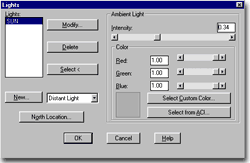

With the AutoCAD Color Index ( ACI ) system you can assign up to 255 Materials By ACI. Though there are only 255 Colors, you are not limited to 255 Materials because you can also Attach Materials By Layer or simply have extra Materials that you may swap for others ( depending on the architecture ). You can also Modify the *GLOBAL* Material to automatically assign Colors to objects that don't automatically receive Materials from other options.
Illustrated to the right I show how the Glass Material is assigned as the default material for Color 141. This is the Color Number Architectural Desktop 3 - 3.3 uses for Glazing within the Model Display Representation of objects like Windows.
If you are interested in learning how to produce
Architectural Desktop work similar to that illustrated here, check out our Architectural
Desktop eGuides. The Architectural
Desktop 3 Presentation eGuide not only covers how to Render in ADT but how to produce
Rendering Template Files such as the one discussed here.