Introduction
Thank you for your interest in the Kitchen Cabinets 6 eKit
by ARCHIdigm. Before you decide to purchase this product we would like
to inform you about what you get and how it works so you don't end up buying
something you don't want.The first and
most important aspect of this Kit that you need to be clear about is that it
is not a software product and it does not do anything on its own.
Basically, this Kit is a library of Styles and MvBlocks designed
exclusively for Autodesk®'s
Architectural Desktop 2006 CAD
program.
The second important aspect of this kit that
we want to make clear is the philosophy behind its structure. Having
been designed in an office that primarily focuses on residential
architecture, we approached the need for creating Cabinetry much like many
architects approach building design: Pre-design ( Massing ),
Development (Refinement), Presentation (3D Models with Rendering)
and Construction Documentation.
|
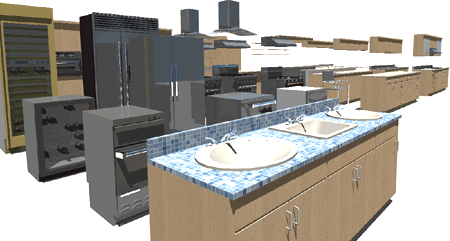 In this list we focused our attention on the last part because that pays the
bills but we also wanted something that looked good in Presentations while
being simple enough to use for early schematic designs. We did not
design this kit to be a solution for true Cabinet Layouts since we see that
as something for Shop-Draw by professional Cabinet Makers. The Upper
and Lower Cabinet Styles have been configured to match industry standard
dimensional specifications and you can modify them for unique design
solutions.
In this list we focused our attention on the last part because that pays the
bills but we also wanted something that looked good in Presentations while
being simple enough to use for early schematic designs. We did not
design this kit to be a solution for true Cabinet Layouts since we see that
as something for Shop-Draw by professional Cabinet Makers. The Upper
and Lower Cabinet Styles have been configured to match industry standard
dimensional specifications and you can modify them for unique design
solutions. |
|
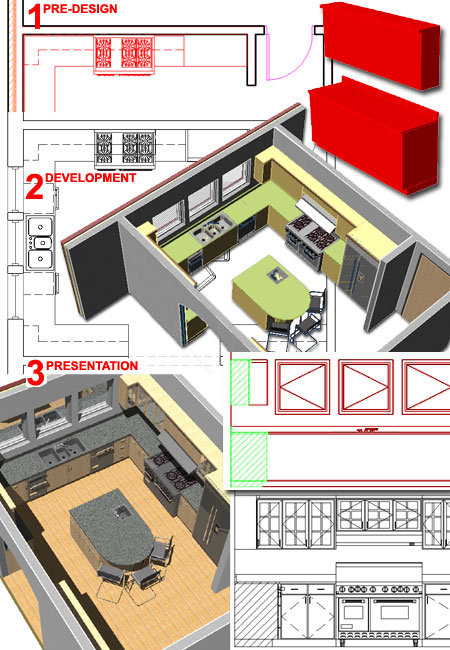
The Three Phases
Illustrated to
the right are some shots of how we employ this kit for creating design
solutions that may end up as Renderings but always end up in Construction
Documents.
Pre-design
Use Standard Base and Upper Cabinet Styles with
standard dimensions to begin a kitchen study and/or to help clients
understand rudimentary design intent. Cabinets can be displayed using
the default Low Detail Display Configuration to produce a "By
Block" homogeneous color.
Development
Standard Base and Upper Cabinet Styles can be refined dimensionally or
swapped ( via Tool icon ) for other Cabinet Styles. Cabinets can be
Trimmed or Broken (Break command), Extended and
Stretched. Sinks take advantage of ADT's new Interference Block so
you can subtract sinkholes from countertops. Special Endcaps
can be applied for extra detailing or unique design requirements such as
curved overhangs. There's even an option to Sweeping Molding along the
top of the Upper Cabinets. Included MvBlocks have plenty of detail to
impress your clients.
Presentation
Though Presentation can actually be a part of Pre-design, Development
and Construction Documents, we see this phase as the one where you put in
that extra effort to really put some jazz into the presentation. For
this phase we provided Door and Drawer Units that can be Anchored
into the Base and Upper Wall Cabinets. Once a Unit is in place, you
can even swap Doors and Knobs. For live-linked 2D
Elevations, all of the linework can be captured; potentially saving you
hours of tedious mind-numbing drawing time with AutoCAD Lines. Base
and Upper Cabinet Styles come with default Material assignments that
you can, ofcourse, change for whatever Materials you have in your library.
The Cabinets have been divided into primary forms: Base, Body, Countertop,
Backsplash, and Trim.
In Plan View we
minimized the display of linework to match
how most residential architects draw cabinets. As you study your
design, you can take advantage of ADT's Low, Medium and High Detail Display
Configurations to display the Cabinet Styles as homogenous masses ( ByBlock
), as individual components (pre-assigned Colors) and as Render-ready ( By
Material ).
|
 |
| The Content
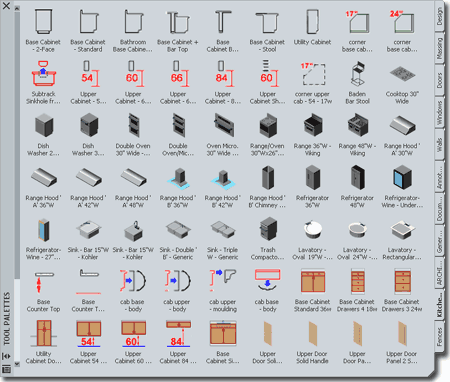
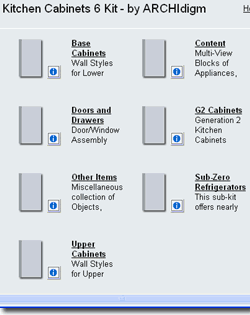 The entire kit was designed to work with ADT's Tool Palettes,
as illustrated to the right, and after installation you simply assemble one
or more Palettes as you see fit by dragging content out of the Kitchen
Cabinets 6 eKit Catalog (from the
Content Browser). The entire kit was designed to work with ADT's Tool Palettes,
as illustrated to the right, and after installation you simply assemble one
or more Palettes as you see fit by dragging content out of the Kitchen
Cabinets 6 eKit Catalog (from the
Content Browser).
There are five Base Cabinet Styles, one
Utility Cabinet Style, one Upper Cabinet Style ( 5 standard heights), one
Shelf Style ( two standard heights) and numerous Door and Drawer Unit
Styles. There are also numerous MvBlocks of items ranging from
appliances to sinks.
Below is a list of the MvBlocks and Object
Styles that you will find in this kit. |
 |
Multi-View
Blocks
Sinks and Lavatories
I_Plumb_Lav_Oval_19
I_Plumb_Lav_Oval_24
I_Plumb_Lav_Rect_20x18
I_PLUMB_SINK_KITCHEN_SINGLE_LARGE
I_PLUMb_SINK_KITCHEN_APRON
I_Plumb_Sink_Kitchen - Double B
I_Plumb_Sink_Kitchen - Single B
I_Plumb_Sink_Kitchen - Triple
I_PLUMB_BAR_SINK_KOHLER_15W
I_PLUMB_FAUCET_KITCHEN_A
Refrigerators - Static
i_appl_24x36_Refrigerator
I_Appl_Ref_Case_42x84
I_APPL_REFR_WINE_KITCHENAID_24W
I_APPL_REFR_WINE_SUB-ZERO_427_27W
Refrigerators - Parametric
More
Information>>
I_APPL_REF_SUB-ZERO_315W_16
I_APPL_REF_SUB-ZERO_424_24W
I_APPL_REF_SUB-ZERO_427_27W
I_APPL_REF_SUB-ZERO_427R_27W
I_APPL_REF_SUB-ZERO_430_30W
I_APPL_REF_SUB-ZERO_601F_36W
I_APPL_REF_SUB-ZERO_601R_36W
I_APPL_REF_SUB-ZERO_601R-G_36W
I_APPL_REF_SUB-ZERO_611G-S_30W
I_APPL_REF_SUB-ZERO_611S_30W
I_APPL_REF_SUB-ZERO_632S_48W
I_APPL_REF_SUB-ZERO_650G-S_36W
I_APPL_REF_SUB-ZERO_650S_36W
I_APPL_REF_SUB-ZERO_661S_36W
I_APPL_REF_SUB-ZERO_685S_42W
I_APPL_REF_SUB-ZERO_695S_48W
I_APPL_REF_SUB-ZERO_700BC_27W
I_APPL_REF_SUB-ZERO_700BF_27W
I_APPL_REF_SUB-ZERO_700BR_27W
I_APPL_REF_SUB-ZERO_700TC_27W
I_APPL_REF_SUB-ZERO_700TF_27W
I_APPL_REF_SUB-ZERO_700TR_27W
I_APPL_REF_SUB-ZERO_736TC_36W
Ranges and Cooktops
I_APPL_RANGE_THERMADOR_RDF30_30W
I_Appl_Range_Range 30x26
I_APPL_RANGE_VIKING_VGRC_36W
I_APPL_RANGE_VIKING_VGRC_48W
I_APPL_OUTDOOR_GRILL_KITCHENAID_KFGR364_36W
I_Appl_Cooktop_21x30
I_APPL_COOKTOP_VIKING_VECU_30W
I_APPL_COOKTOP_VIKING_VECU_36W
I_APPL_COOKTOP_VIKING_VGSU_30W
I_APPL_COOKTOP_VIKING_VGSU_36W
Exhaust Hoods
I_Appl_Range_Hood_A_30x18x8
I_Appl_Range_Hood_A_36x18x8
I_Appl_Range_Hood_A_42x20x8
I_Appl_Range_Hood_A_48x20x8
I_Appl_Range_Hood_B_36x20
I_Appl_Range_Hood_B_42x27
I_Appl_Range_Hood_B_Chimney
I_Appl_Range_Hood_Island_KitchenAid_36
I_Appl_Range_Hood_Island_KitchenAid_48
I_Appl_Range_Hood_KitchenAid_30
I_Appl_Range_Hood_KitchenAid_36
I_Appl_Range_Hood_KitchenAid_48
Ovens - Wall and Microwave
I_APPL_DOUBLE_OVEN_30_BUILT-IN
I_APPL_OVEN_MICRO_30_BUILT-IN
I_APPL_OVEN_SINGLE_30_BUILT-IN
I_APPL_MICRO_30_BUILT-IN
I_APPL_MICRO_24_COUNTER
I_APPL_MICRO_HOOD_24_COUNTER
Dishwashers and Trash Compactor
I_APPL_DISH_WASHER_VIKING_24W
I_APPL_DISH_WASHER_BOSCH_24W
I_APPL_DISH_WASHER_VIKING_36W
I_APPLL_TRASH_COMPACTOR_VIKING_18W
Laundry Washers and Dryer
I_APPL_WASHER_BASE_WHIRLPOOL_27W
I_APPL_DRYER_WHIRLPOOL_27W
I_APPL_WASHER_WHIRLPOOL_27W
Other Items
I_Furn_Chair_Baden_Bar_Stool
I_Furn_Chair_zanzibar_stool
I_Furn_Chair_BRNO_CHAIR
Appliance_Blender
Appliance_Toaster
Cookware_Cup_Coffee
Cookware_Dinner_Plate_10in_dia
Cookware_Pot_Medium
Cookware_Wine_Glass |
GENERATION 1 CABINETS
(BASED ON WALLS)
Base Cabinets
kitchen_base_bar_x
kitchen_base_cab_+_bar_x
kitchen_base_cab_x
kitchen_base_cab_x_2-face
kitchen_base_cab_x_stool
kitchen_counter_top_splash_x
kitchen_counter_top_x
kitchen_splash_x
Upper Cabinets
kitchen_upper_cab_54_x
kitchen_upper_cab_60_x
kitchen_upper_cab_66_x
kitchen_upper_cab_72_x
kitchen_upper_cab_84_x
kitchen_upper_shlf_54_x
kitchen_upper_shlf_60_x
kitchen_util_cab_x
kitchen_upper_cab_36_x
kit_cab_soffit_7ft_up_13in_wide
GENERATION 2 CABINETS
(BASED ON CURTAIN WALLS)
Base Cabinets
kitchen_base_cab_x_2_face
kitchen_base_cab_x_2_face_corner
kitchen_base_cab_x_open_end
kitchen_base_cab_x_open_end_24_off_backsplash
kitchen_base_cab_x_open_end_corner
kitchen_base_cab_x_open_one_end
kitchen_base_cab_x_open_one_end_24_off_backsplash
kitchen_base_cab_x_open_one_end_corner
kitchen_base_cab_x_square_end
kitchen_base_cab_x_square_end_2_corner
kitchen_base_cab_x_square_end_2_corner_sink
kitchen_base_cab_x_square_end_corner
kitchen_base_cab_x_square_end_sink
kitchen_base_cab_x_stool_open_end
kitchen_base_cab_x_stool_open_end_corner
Upper Cabinets
kitchen_upper_cab_2-face_glazed_54
kitchen_upper_cab_2-face_glazed_54_corner
kitchen_upper_cab_2-face_glazed_muntins_54
kitchen_upper_cab_2-face_glazed_muntins_54_corner
kitchen_upper_cab_36
kitchen_upper_cab_36_2_corner
kitchen_upper_cab_36_corner
kitchen_upper_cab_54
kitchen_upper_cab_54_2_corner
kitchen_upper_cab_54_corner
kitchen_upper_cab_60
kitchen_upper_cab_60_2_corner
kitchen_upper_cab_60_corner
kitchen_upper_cab_66
kitchen_upper_cab_66_2_corner
kitchen_upper_cab_66_corner
kitchen_upper_cab_72
kitchen_upper_cab_72_2_corner
kitchen_upper_cab_72_corner
kitchen_upper_cab_84
kitchen_upper_cab_84_2_corner
kitchen_upper_cab_84_corner
Utility Cabinets
kitchen_utility_cab_x
kitchen_utility_cab_x_double_oven
kitchen_utility_cab_x_full_height
kitchen_utility_cab_x_open_center
Door/Drawer Unit Styles
Base Cabinet Drawers 3 24w
Base Cabinet Drawers 4 18w
Base Cabinet Sink 36w
Base Cabinet Standard 36w
Utility Cabinet Standard 24w
Upper Cabinet Standard 36w
Door Styles
Cabinet Base Door Sngl Panel 2 Solid
Cabinet Base Door Sngl Panel Solid
Cabinet Base Door Sngl Solid
Cabinet Base Door Sngl Solid Knob
Cabinet Base Drawer Panel Solid
Cabinet Base Drawer Solid
Cabinet Base Drawer Solid Blank
Cabinet Base Drawer Solid Knob
Cabinet Upper Door Sngl Glazed
Cabinet Upper Door Sngl Glazed Muntins
Cabinet Upper Door Sngl Panel
Cabinet Upper Door Sngl Panel 2 Solid
Cabinet Upper Door Sngl Panel Arch Knob
Cabinet Upper Door Sngl Solid
Cabinet Upper Door Sngl Solid Knob
|
Buy Codes,
Access OSMOSIS and Download
| Access |
The
Kitchen Cabinets 6 eKit includes a year of Access to the OSMOSIS
website. Your purchase will provide you with a User Name and
Password to the OSMOSIS website where you will be able to download this kit,
the User eGuide and check for updates. |
| BUY |
Purchase
the latest Kitchen Cabinets eKit to acquire this version as well.
Newest version includes all older versions. |
|
FYI |
We also
have a 3 eKit Bundle - see
www.archidigm.com/classroom for a full listing of our guides and
kits. |
When you make your purchase, you will receive
a confirmation e-mail within minutes ( if purchase is made on-line but
longer if by phone, fax or mail ) that will contain your User Name and
Password.
Go to
www.archidigm.com/classroom/osmosis or look for the OSMOSIS icon on the
ARCHIdigm.com website to enter our subscription center. There you will
be able to download the Kitchen Cabinets 6 eKit Installation file, User Guide
and check for Updates.
kits@archidigm.com |
CAD
and IT Managers:
Some offices have highly customized template files with unique Display
Representations, Sets and Configurations that may not work with our kit.
We designed this kit for optimum performance using the default template
files that come with ADT but all that means is that we utilized the High,
Medium, Low and Presentation Display Configurations. Since the
Presentation Display Representation is not a Standard Display Representation
it will be introduced automatically as will some of the Material Definition
Style Display Representation Overrides that we had to use in order to
produce Cabinet-like linework.The
Object Style files are devoid of undesirable Layers, Colors and Plot Styles.
Installation Issues
Due to how the Tool Palette uses hard-coded paths this kit has been
designed for a local installation "C:\Program Files\ARCHIdigm\Kitchen
Cabinets 2006 Kit". If this location will not work in your environment,
you can use the Content Browser "Move" tool to relocate all content and set
new path statements for Tool icons ( discussed in our User Guide). |
 KITCHEN
CABINETS 6 eKIT
for Architectural Desktop
2006
KITCHEN
CABINETS 6 eKIT
for Architectural Desktop
2006